- Prepare the document for migration
- Copy the functions
- Recreate the functions in the destination account
Prepare the document for migration
- Open the Analytics tab.
- Create a new empty document.
- This document will be used to store the user-defined functions during the migration process.
Copy the functions
- Go to Edit > User defined functions.
- Select the function you want to migrate.
- Copy the function.
- Select Document section.
- Click on Add button.
- Paste the function.
- Click Save.
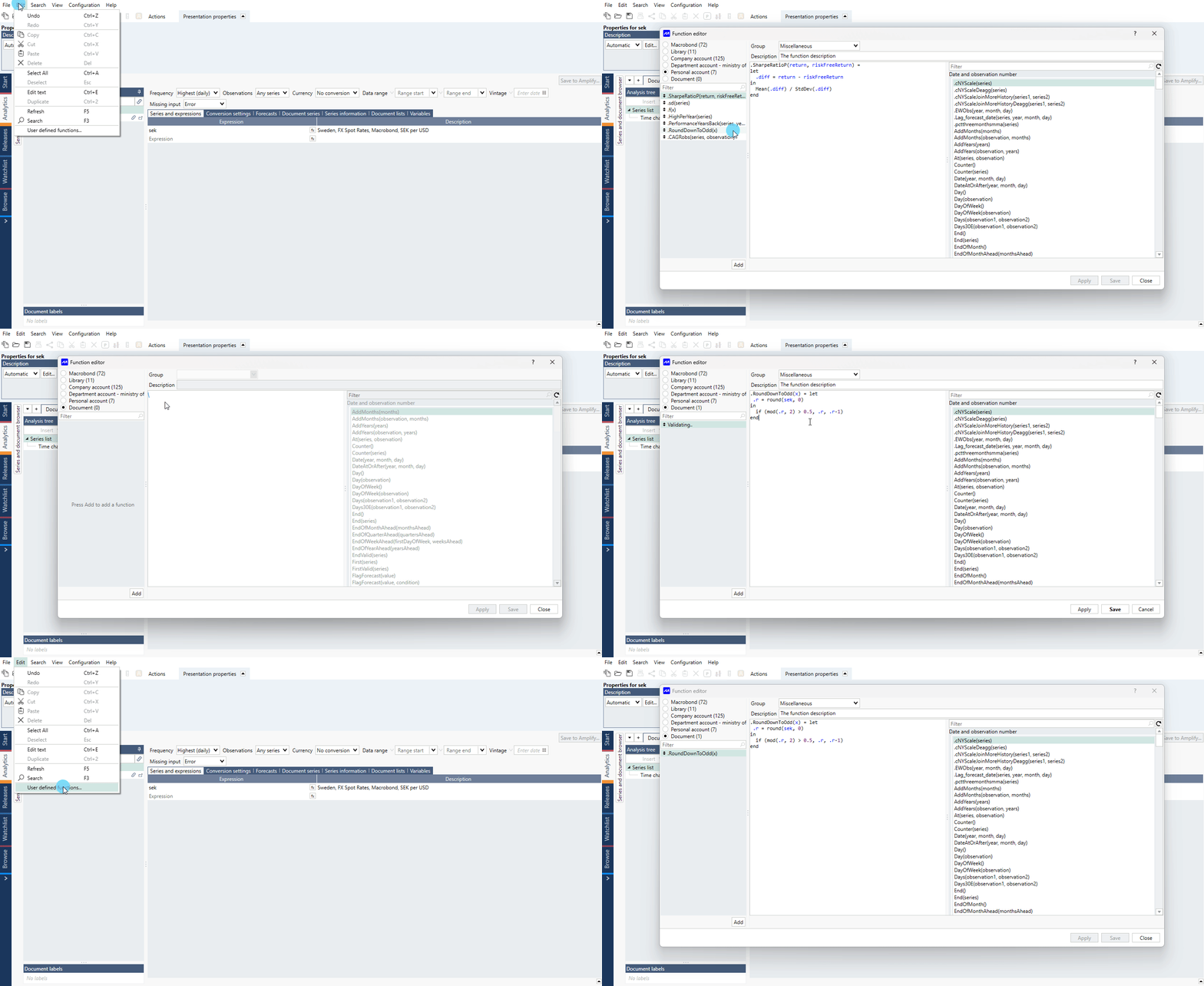
Repeat these steps until all required functions have been added to the document.
Important: Copy the functions in the same order in which they appear in the source account. User-defined functions are displayed in creation order and are not automatically sorted. Recreating them in a different order may affect their organization in the destination account.
Recreate the functions in the destination account
- Sign in to the destination account.
- Open the document containing the saved functions.
- Copy each function from the document.
- Open Edit > User defined functions.
- Recreate the functions one by one, maintaining the original order.
The user-defined functions are now available in the destination account.