To record your existing region filters:
- Open the Analytics tab.
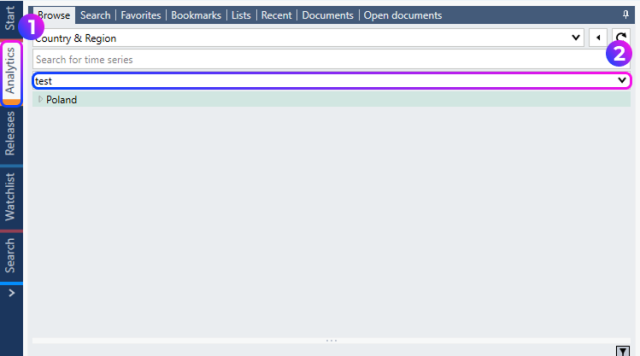
- Select the Browse sub-tab.
- Navigate to Region filters > Load.
- From Open entity list open each region filter stored in the account, one at a time.
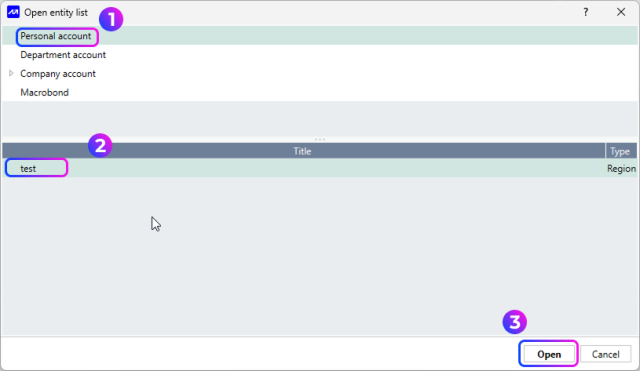
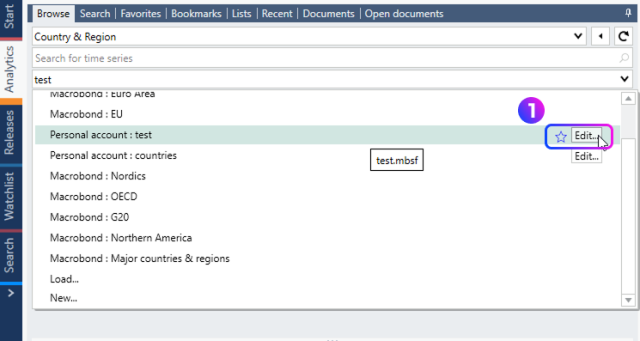
For each filter:
- Select the filter and click Edit.
- Review the filter settings.
- Save a screenshot or otherwise record the filter configuration for reference.
After signing in to the destination account:
- Create a new region filter.
- Re-enter the settings using the information recorded from the original filter.
- Repeat the process for all region filters that need to be migrated.
Important: Review and save the configuration of every region filter before switching accounts. Region filters must be recreated individually, and their settings are required to ensure an accurate migration.