To record your existing chart view sizes:
- Open the Analytics tab.
- Add an empty chart, such as a Time chart.
- Open Chart view size.
- Select either:
- Application fixed size, or
- This chart fixed size
- Open the Favorite sizes drop-down menu.
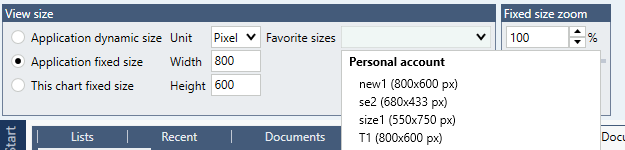
Create a screenshot or save a record of all available favorite sizes. This information will be needed when recreating the sizes in the destination account.
Important: Recreate the sizes in the same order in which they appear in the source account. Favorite sizes are displayed in creation order and are not automatically sorted.
After signing in to the destination account, manually create the favorite sizes using the values recorded from the original account.