Plain / By region
To migrate Plain or By Region list:
- Create a new document.
- Copy all time series codes from the original list into the document.
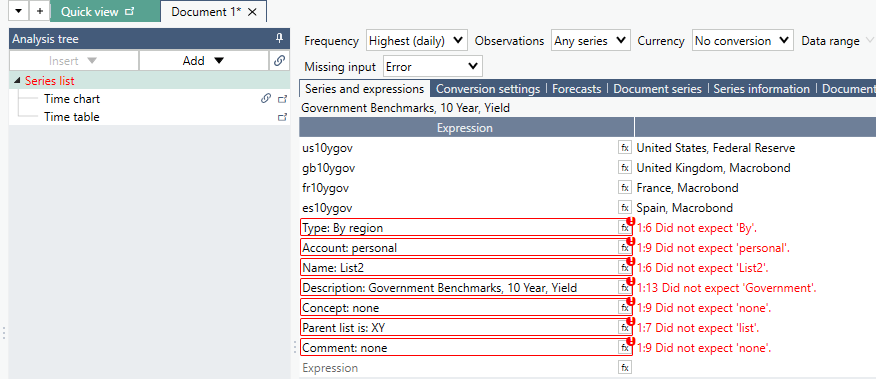
- Record the list properties that will be needed when recreating the list:
- List type
- Account
- List name
- Description
- Concept
- Parent list
- Comment
- Save the document locally for reference during the migration process.
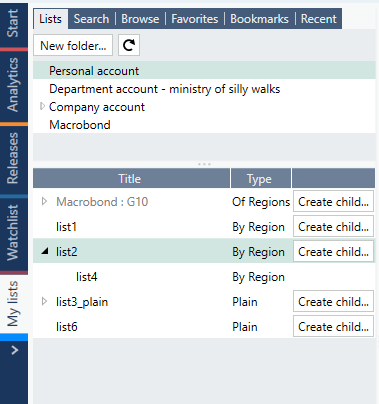
Tip: Take a screenshot of the My lists tree structure in the source account. This can help you verify that all lists have been recreated correctly in the destination account.
After signing in to the destination account:
- Open the My lists tab.
- Click Create new list.
- Select the appropriate Location and List type.
- Click Create.
- Copy the time series codes into the Series column.
- Re-enter the remaining list properties using the information saved from the original list.
- Verify that the list matches the original configuration.
Of region
To migrate an Of Region list:
- Save the list's country selections, either in a document or in a text file.
- Create a new Of Region list in the destination account.
- Manually add the countries that were included in the original list.
Note: Of Region lists must be recreated manually. There is currently no automated migration method for this list type.