Introduction
The Macrobond Data API for Python uses either the Macrobond Web REST API or the Macrobond Client data API to obtain time series with values and metadata. The API consists of a set of functions in common between the underlying APIs as well as specialized functions unique to each implementation.
You get time series directly as Pandas series.
Requirements
This API (Python wrapper) can be used only with Data+, Professional or Enterprise license.
Macrobond Data API for Python officially supports Python 3.6+.
Installation
Macrobond Data API for Python is available on PyPI:
python -m pip install macrobond-data-api
Keyring
When using WebClient it is recommended to use the system keyring. Keyring should only be necessary if you have a license which includes the Web API. If you have Data+, Professional or Enterprise license and use the Desktop COM API, additional credentials and the keyring are not needed.
An easy way to store the credentials in the keyring is to the included script "save_credentials_to_keyring" using this command:
python -c "from macrobond_data_api.util import *; save_credentials_to_keyring()"
Supported keyrings:
- macOS Keychain
- Freedesktop Secret Service supports many DE including GNOME (requires secretstorage)
- KDE4 & KDE5 KWallet (requires dbus)
- Windows Credential Locker
Error: failed testing username and password
raise self.oauth_error_class(
authlib.integrations.base_client.errors.OAuthError: invalid_client:

Error: failed testing username and password
This error usually derives from two situations:
- You do not have the proper Macrobond license to use it – the Keyring should only be necessary if you have a license which includes the Web API.
Using Python, R, EViews or MATLAB API you must use the COM API - you do not need to enter any passwords in them as they are fetched from the Macrobond Analysis application. - The credentials are being mistyped. When using Windows Command Prompt to set up the Keyring it might be confusing as nothing shows up when you type the password - this is normal security mechanism. Also, by default, you cannot copy and paste in the password field, it must be typed manually.
- To be able to copy the password in the Command Prompt you must enable it in the Command Prompt Properties. To do that, open Command Prompt, right-click on the title bar and select Properties. In here enable 'Use Crtl+Shift+C/V as Copy/Paste'.
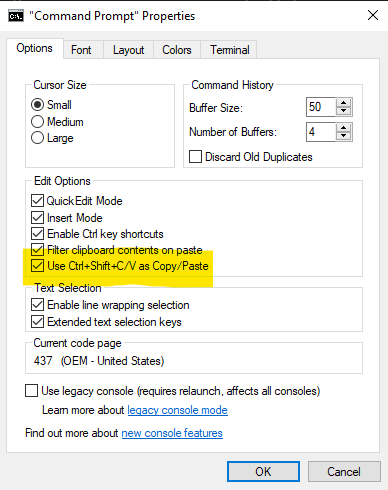
- To be able to copy the password in the Command Prompt you must enable it in the Command Prompt Properties. To do that, open Command Prompt, right-click on the title bar and select Properties. In here enable 'Use Crtl+Shift+C/V as Copy/Paste'.
Working with Python wrapper
Learn more about the Commonly used metadata in Macrobond.
Download one series (Basic usage)
This will use the Web API if credentials are stored in the keyring. If not, it will attempt to use the local desktop COM API.
import macrobond_data_api as mb_api

usgdp = mb_api.get_one_series("usgdp")

print(usgdp)
Download one series (Advanced usage)
Instead of using the keyring and automatic detection of what data API to use, you can explicitly create either a WebClient or ComClient object. You should create these objects once and then use them for all your requests.
WebClient version (if you have WebApi license):
#web
from macrobond_data_api.web import WebClient

# Create one instance of the WebClient session object and use it for all API calls
with WebClient('client id', 'client secret') as api:
    # Do all API calls here
    series = api.get_one_series('usgdp')
    print(series)
ComClient version (if you have Data+, Professional or Enterprise license):
#com
from macrobond_data_api.com import ComClient

# Create one instance of the ComClient session object and use it for all API calls
with ComClient() as api:
    # Do all API calls here
    series = api.get_one_series('usgdp')
    print(series)
Error: invalid client credentials
This error might happen because you are trying to access WebClient version of Python wrapper when only having Data+, Professional or Enterprise license. For WebClient, you need WebApi license. If you have Data+, Professional or Enterprise license, use ComClient.
Extensive guide - more examples
We have prepared examples in Jupyter Notebooks to help you start using Python wrapper. See them on our Github.